
Traditional automation follows predefined instructions. When a specific condition is met, the system performs a fixed action. This approach works well for predictable processes, but it struggles when a task requires contextual understanding, prioritization, or adaptation to new information.
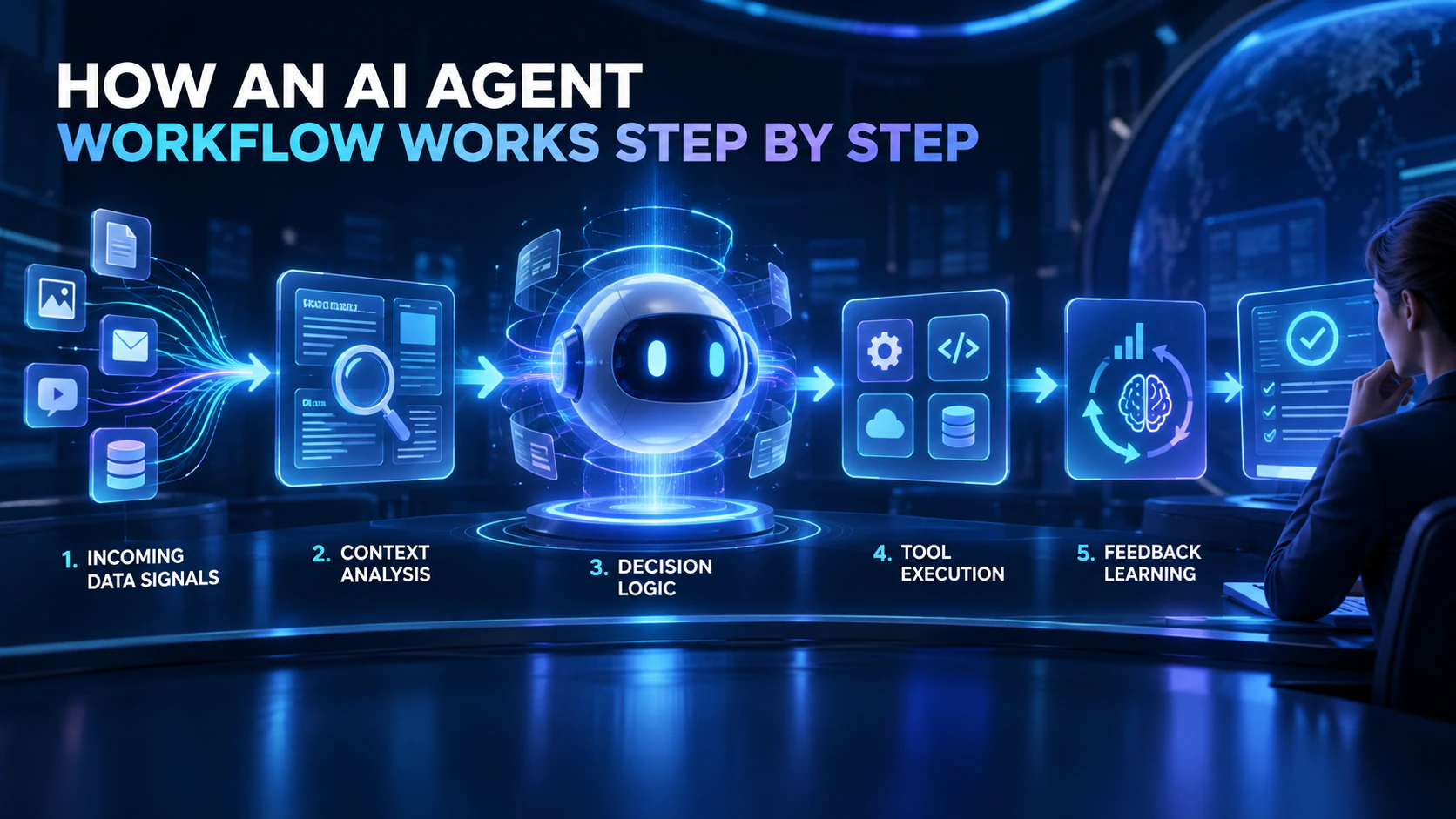
An AI agent workflow adds perception, reasoning, decision-making, action, and feedback to the automation process. Instead of simply executing instructions, an AI agent can evaluate a situation, select an appropriate response, use connected tools, and involve a human when necessary.
Understanding how this workflow operates can help organizations identify suitable use cases and introduce AI agents into business processes safely.
## Step 1: Define the Goal and Success Criteria
Every AI agent workflow should begin with a clearly defined objective. A goal such as “use AI” or “improve efficiency” is too broad. The organization should instead describe the specific problem it wants the agent to solve.
Examples might include reducing customer-support response times, organizing market research, identifying recurring product issues, or accelerating the review of incoming documents.
The team should also establish measurable success criteria. These may include completion time, error rate, volume of manual work eliminated, customer satisfaction, conversion rate, or the percentage of cases escalated to a human.
A clear objective keeps the agent aligned with the intended business outcome and creates a reliable basis for future evaluation.
## Step 2: Receive a Trigger
An AI agent needs to know when it should begin working. A trigger is the event or condition that activates the workflow.
Triggers can include a newly submitted form, an incoming customer message, a database update, a project status change, a performance threshold, or a scheduled time. For example, a workflow may begin whenever a new customer complaint enters a support system.
Unlike a simple script that runs at fixed intervals, an AI agent can monitor multiple data sources and respond when relevant conditions appear.
Triggers must be configured carefully. If they are too broad, the workflow may run unnecessarily and increase operating costs. If they are too restrictive, important events may be overlooked.
## Step 3: Collect and Prepare Relevant Data
Once activated, the agent gathers the information required to complete its task. This information may include structured data from databases and spreadsheets, as well as unstructured data from emails, reports, contracts, customer reviews, images, or conversations.
In a sales workflow, for instance, an agent might examine a prospective customer’s submitted information, company size, previous interactions, and product interests.
The workflow must define which sources the agent is allowed to access. It should also verify whether the available information is complete, current, and relevant.
Data quality has a direct effect on performance. Even a capable AI model can produce unreliable results when its inputs are outdated, incomplete, or contradictory.
## Step 4: Interpret the Context
After collecting the necessary data, the AI model analyzes its meaning. It may classify text, extract important details, summarize documents, identify sentiment, or connect the new information with existing organizational knowledge.
Consider a customer-support message. The agent must determine whether the customer is asking a routine question, expressing dissatisfaction, requesting a refund, or reporting a critical technical problem.
This contextual interpretation is one of the main differences between an AI agent and traditional rule-based automation. A conventional system usually searches for predetermined conditions. An AI agent can recognize similar intentions even when people express them in different ways.
However, contextual reasoning is not always correct. Workflows involving important decisions should therefore include validation rules and appropriate human checkpoints.
## Step 5: Decide What to Do Next
The agent then selects an action based on the goal, available context, business rules, and operational constraints.
A simple workflow may require only one decision. A more advanced process may involve a sequence of actions that changes according to the information discovered along the way.
In customer service, the agent might choose to draft an answer, retrieve information from a knowledge base, create a technical ticket, or escalate the case to a specialist. In marketing, it could review campaign performance, identify useful patterns, prepare content recommendations, and submit a draft for approval.
Organizations should define clear boundaries at this stage. These may include restrictions on data access, approved tools, spending limits, prohibited actions, and decisions that always require human authorization.
## Step 6: Use Tools and Execute Actions
Once a decision has been made, the agent uses connected applications, databases, and APIs to carry out the task.
It may update a record, generate a document, send a notification, create an assignment, schedule an activity, or activate another automated process.
An advanced agent workflow may move through several reasoning-and-action cycles. For example, an agent preparing a report might discover that important information is missing. It can then retrieve additional data, evaluate the new material, and generate an updated report.
Tool permissions should follow the principle of least privilege. The agent should receive only the access required to perform its assigned task. Limiting permissions reduces the risk of unauthorized changes, data exposure, and unintended actions.
## Step 7: Add Human Review
AI agents should not have the same level of autonomy in every situation. Low-risk and easily reversible actions may be completed automatically. Decisions involving payments, contracts, confidential data, account permissions, or external commitments should usually require human approval.
Human oversight is not simply a response to system failure. It should be designed into the workflow from the beginning.
Teams need to determine which events require escalation, who is responsible for reviewing them, what information the reviewer will receive, and what happens if approval is delayed.
A clear human-in-the-loop process preserves the speed of automation while preventing uncertain AI judgments from immediately affecting customers or critical operations.
## Step 8: Record Results and Improve the Workflow
After the task is completed, the system should record the inputs, actions, approvals, outputs, and final outcome. These records support auditing, troubleshooting, performance analysis, and regulatory compliance.
Teams can then evaluate the workflow using business metrics and human feedback. If employees repeatedly correct the same type of result, the organization may need to improve its instructions, data sources, decision rules, or permission settings.
An AI agent workflow is therefore not a straight line that runs only once. It is a continuous cycle of detecting signals, interpreting context, making decisions, executing actions, receiving feedback, and adapting to new information.
## The Real Value of AI Agent Workflows
The value of an AI agent workflow extends beyond automating repetitive tasks. It can connect fragmented information, tools, and teams so that complex work continues moving without constant manual coordination.
These workflows can accelerate decision-making, reduce operational friction, and help organizations manage growing workloads. However, reliability does not come from maximizing autonomy. Effective systems depend on clear goals, trustworthy data, controlled permissions, human oversight, and complete activity records.
When those foundations are in place, an AI agent can evolve from a passive question-answering tool into a digital operator capable of understanding tasks, coordinating steps, and helping turn business objectives into measurable outcomes.